P999 Login: How to Sign In to Your P999 Game Account
If you already have a P999 Game account, the P999 login takes less than a minute. This guide shows you exactly how to sign in, how to reset a forgotten password, and what to do when the app will not let you in.

Don’t have an account yet? Follow our P999 register guide first, then come back here.
What You Need for P999 Login
- The official P999 app installed on your Android phone (see our P999 download guide)
- The mobile number you registered with (03xx format)
- Your password
- The SIM card for that number, so you can receive OTP codes
How to Log In – Step by Step
- Open the app on your phone.
- Tap Login on the welcome screen.
- Enter your registered mobile number and your password.
- Tap Login. Your dashboard opens with your wallet balance and games.
If the app asks for a verification code, enter the 6-digit OTP sent to your number by SMS.
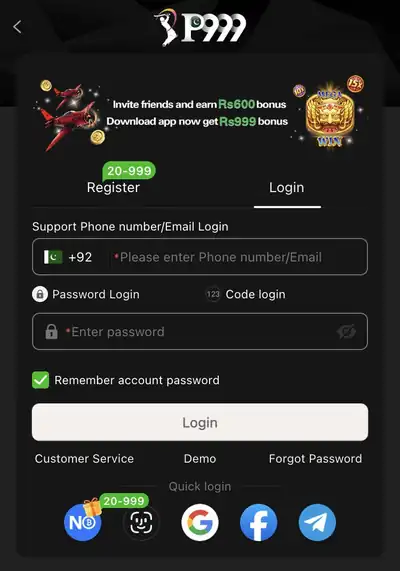
Forgot Your Password? Reset It in One Minute
- On the login screen, tap Forgot Password.
- Enter your registered mobile number.
- Type in the OTP you receive by SMS.
- Create a new, strong password and log in again.
Common P999 Login Problems and How to Fix Them
“Incorrect number or password”
Check that you entered the same number you registered with, without spaces. Passwords are case-sensitive, so check Caps Lock. If you still cannot get in, use Forgot Password.
OTP code not arriving
Make sure the SIM for your registered number is in the phone and has signal. Wait about a minute before tapping resend, and check that SMS from unknown senders is not blocked.
App crashes or will not open
You may be using an old version. Download the latest APK from the official site and install it over the old app. Your account and wallet are kept. Restarting your phone and clearing the app cache also helps.
Account blocked or frozen
Contact support through the in-app chat. Have your registered number ready.
Real-Money Account vs Play Store Version
The version on Google Play uses virtual coins only and does not connect to JazzCash or Easypaisa. To log in to your real-money wallet, use the official APK.
Keep Your Account Safe
- Never share your OTP with anyone. Real support staff will never ask for it.
- Use a strong password that you do not use anywhere else.
- Log out if you use a shared phone.
- Download the app only from the official website. Fake apps and mirror sites can steal login details.